
Big News: Getty Images Now Offers Free Embeds of Photos From Their Massive Database, Available For Non-Commercial Use
Getty Images (not to be confuses with the Getty Research Institute or Getty Museum) is one of the largest distributors of photographs (creative & editorial imagery) and videos in the world. You see the images they distribute everywhere.
What’s New?
Any web user can now embed imagery from their massive database for non-commercial [discussion of what non-commercial means below] use on websites, blogs and social media channels through a new embed tool. About 35 million images from the Getty database are available. That’s a huge amount but it’s not everything in the Getty Images database.
Note: To search, access, and use embedabble images we suggest searching using the embed tool and NOT the main Getty Images search interface.
1. This specific search query has the proper limits in place to only access embeddable material. Simply enter your keywords.
UPDATE: This query is useful but we’ve found a number of false drops.
2. From the Results Page, Cursor Over or Click on Any Image and Look for the Embed Icon
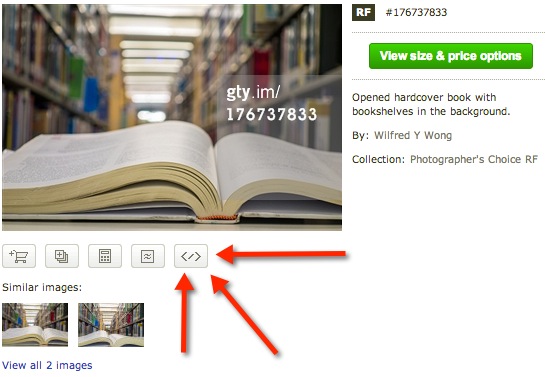
3. Click, Copy and Past the Code, and Embed.
Details and Discussion
Embedded images will include photographer attribution and, when clicked, will link back to www.gettyimages.com where the image can be licensed for commercial use. This will provide people with a simple and legal way to utilize content that respects creators’ rights, including the opportunity to generate licensing revenue.
The embed capability will be supported anywhere HTML can be posted and users will also be able to share images on major social platforms including Twitter, as well as WordPress.
Direct to Getty Embed Info Page
Coverage
From The Verge
It’s a real risk for the company, since it’s easy to screenshot the new versions if you want to snag an unlicensed version. But according to Craig Peters, a business development exec at Getty Images, that ship sailed long ago. “Look, if you want to get a Getty image today, you can find it without a watermark very simply,” he says. “The way you do that is you go to one of our customer sites and you right-click. Or you go to Google Image search or Bing Image Search and you get it there. And that’s what’s happening… Our content was everywhere already.”
From the BBC
Users can choose from sports events, fashion shows, stock images and celebrity gatherings like the Oscars and the Brit Awards.
However, there are some notable exceptions – primarily editorial photos of events such as the 11 September terrorist attacks on America or the protests in Tiananmen Square in 1989.
Its code, which can be cut and pasted onto any website, is similar to the tool YouTube provides for sharing its videos. Images cannot be resized and they will all incorporate a Getty Images logo, as well as a credit for the photographer.
From PetaPixel
At a time when the photo community is increasingly dissatisfied with how Getty does business, this move is bound to draw ire, especially since there will be no way to opt out. But Peters defends the move nonetheless.
There are three reasons, he says, why this is a good thing for both Getty and content creators: shared photos will now be properly attributed, all images will link back to the licensing page so those that need to license it commercially can do so in just a few clicks, and Getty (like YouTube) will use information on who is using that image and how to improve their business. They will also likely implement ads in the near future; again, much like YouTube does with its embeds.
What Does Non-Commercial Use Mean?
From the British Journal of Photography
Blogs that draw revenues from Google Ads will still be able to use the Getty Images embed player at no cost. “We would not consider this commercial use,” says Peters. “The fact today that a website is generating revenue would not limit the use of the embed. What would limit that use is if they used our imagery to promote a service, a product or their business. They would need to get a license.” A spokeswoman for Getty Images confirms to BJP that editorial websites, from The New York Times to Buzzfeed, will also be able to use the embed feature as long as images are used in an editorial context.
From the Nieman Journalism Lab
In order to get to that kind of scale, Getty allows “noncommercial” use. But the Internet has never been able to decide what “noncommercial” really means. If you’re selling a photo for profit, sure, that’s commercial. If you’re using it in an ad for your product, sure, that’s commercial. But what if you’re using it on a website that has ads — is that enough? Or how about if you’re a freelancer and you’re using it on a site meant to promote your career — is that commercial?
Note: The Nieman Journo Lab article by Joshua Benton has much more on usage issues. Worth reading!!!
See Also: Getty Images Terms of Use
Filed under: Awards, News, Patrons and Users, Video Recordings

About Gary Price
Gary Price (gprice@gmail.com) is a librarian, writer, consultant, and frequent conference speaker based in the Washington D.C. metro area. He earned his MLIS degree from Wayne State University in Detroit. Price has won several awards including the SLA Innovations in Technology Award and Alumnus of the Year from the Wayne St. University Library and Information Science Program. From 2006-2009 he was Director of Online Information Services at Ask.com.
ADVERTISEMENT
Archives
ADVERTISEMENT