

Google Scholar Adds Option to Save Citations
The following post reports on something new from Google Scholar but it’s far from a major update or earth shattering new feature. In fact, some might ask (correctly), what took so long to offer it?
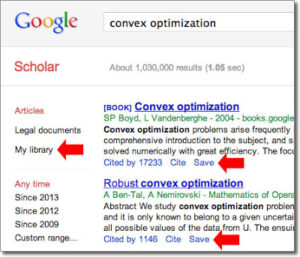
What’s New
Google Scholar has introduced a new feature that allows users (who are logged-in to their Google accounts) an option to save citations to their own Google Scholar Library.
Users will first need to opt-in for the feature here. Then, links to “Save” items are found at the bottom of each citation. Both articles and case law can be saved.
A folder icon appears next to each saved article but we were unable to place items into different folders/collections. For example, saving into various folders is something that you might want to do if you’re working on a number of projects.
To remove a citation from your collection you have to go to each citation and select delete. We were unable to find an option to delete multiple citations from results page.
From the GS Blog Post
You decide what goes into your library and we’ll provide all the goodies that come with Scholar search results – up to date article links, citing articles, related articles, formatted citations, links to your university’s subscriptions, and more.
Other Options
Of course, bibliographic management tools like Zotero, Mendeley, iCyte, and others can also save GS citations quickly and easily. Clicking the “Cite” link below each GS citation provides an option so users can import directly into BibTeX, EndNote, RefMan, RefWorks.
Recent Lack of Google Scholar News
1. Today’s post on the Google Scholar blog is the first one in four months (July 24, 2013).
2. The July post was about the release of GS Metrics for 2012
3. The last post announcing a new Google Scholar feature before today came over a year ago (October 17, 2012) when the option to create a citation for each entry was added.
4. During 2012 new data sorts were announced and a new look to the user interface. The last major new feature announced by Google came in July 2011 when Google Scholar Profiles were introduced.
A September 2013 article about Google Scholar spamming correctly points out that the lack of transparency with GS (in a number of areas) are issues that need to be addressed.
We hope Google works to make this heavily-used research tool more transparent but we’re not holding on breath.
Filed under: Data Files, Libraries, Management and Leadership, News, Patrons and Users, Profiles, Reports

About Gary Price
Gary Price (gprice@gmail.com) is a librarian, writer, consultant, and frequent conference speaker based in the Washington D.C. metro area. He earned his MLIS degree from Wayne State University in Detroit. Price has won several awards including the SLA Innovations in Technology Award and Alumnus of the Year from the Wayne St. University Library and Information Science Program. From 2006-2009 he was Director of Online Information Services at Ask.com.
ADVERTISEMENT
Archives

ADVERTISEMENT